
Sep 10
Ubuntu 26.04: Why does nautilus waste so much screen space?
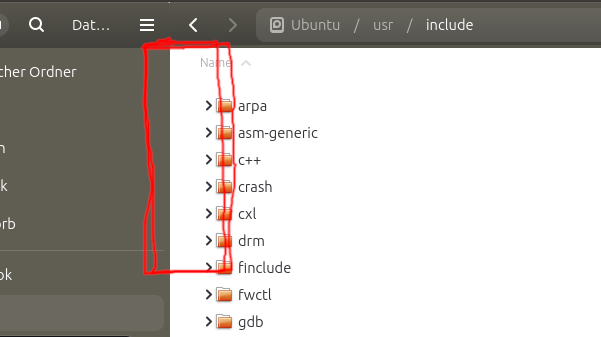
Libadwaita is technically GTK4 - well, sort of. While it utilizes the underlying GTK4 engine, it acts as a rigid enforcement mechanism for GNOME's specific design philosophy. At least this is what seems to be going on.
The biggest headache for long-time Ubuntu users is that many design elements seem completely hardcoded. Libadwaita intentionally bypasses traditional system themes. So far, I have found no way of changing some things. An uphill battle. To make matters worse, the layout leans heavily into mobile-first design. Why is nautilus becoming a "tablet file-manager"? Did users really ask for apps to be touch-friendly? Desktop power-users are left with an annoying amount of padding and excessive margins in list views (and elsewhere - but not to this degree), wasting valuable screen real estate. At least, nautilus could offer a setting somewhere - similar to thunderbird, for example, where users can adjust layout density.
Here, we look at the odd wasted space next to the GtkListView. Don't waste your time navigating and poking around with GTK_DEBUG=interactive. No idea where this extra space is coming from! Actually, it seems to be a bug as even the list view headers are offsetted by the same margin!
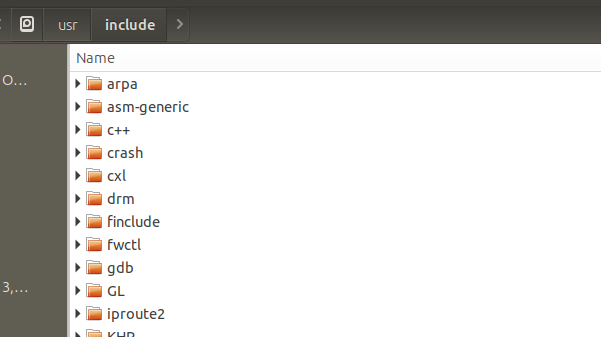
Just compare nemo above. The list view aligns with container borders.
If you know how to reduce margins in nautilus, leave a comment.
Sidequest:
Did you note how font is rendered thicker, with more punch here in nemo, depicted above? Well, this is due to font tweaking in order to bring back the old Ubuntu look, on Ubuntu 26. Sadly, this only applies to GTK3 apps...